



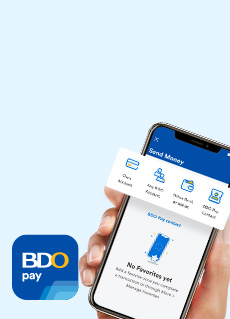
Ways to Send Money via BDO Pay
To Own Account
Send money to any of your own BDO Accounts.


Via QR Code
Scan or upload any valid QR code to Send Money.
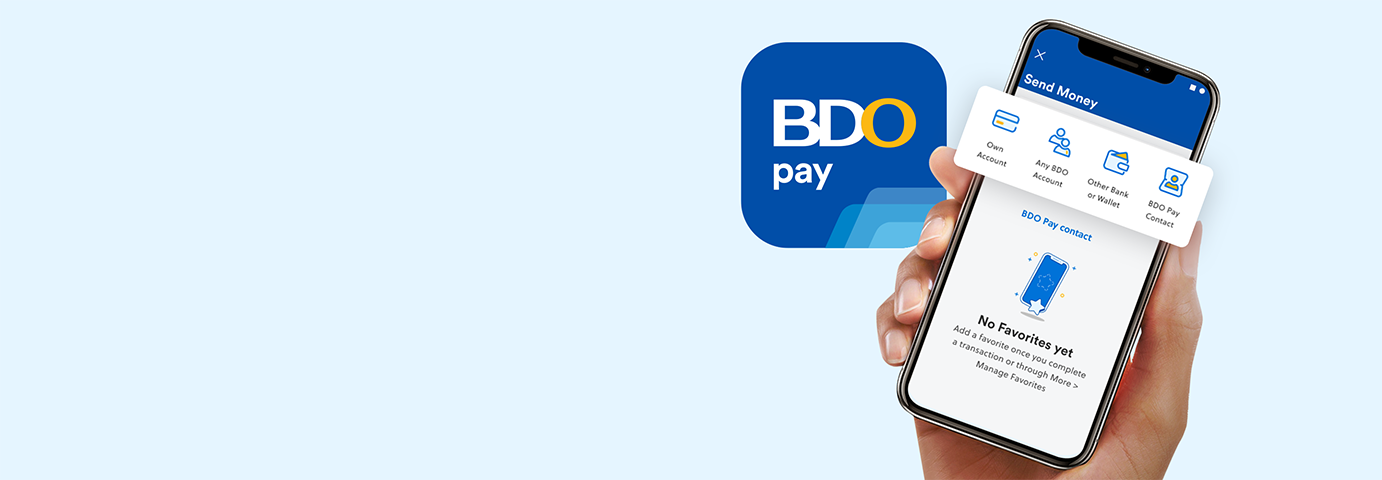
Ways to Send Money via BDO Online
.svg)
Via Wire Transfer
Send money from your USD account to another local or foreign bank on the BDO Online website.


Limits and Fees
Send Money to Any BDO Account
| Send Money to Any BDO Account |
  |
Daily transaction limit: ₱500,000 Minimum transaction amount: ₱1 |
Free | Real-time credit |
| Send Money to Any BDO Account (Same Foreign Currency) |
 |
Daily transaction limit: • USD to USD 4,000 • AUD to AUD 6,000 • CAD to CAD 5,000 • CNY to CNY 28,000 • EUR to EUR 4,000 • GBP to GBP 3,000 • HKD to HKD 28,000 • JPY to JPY 565,000 • SGD to SGD 5,000 • BND to BND 6,000 • KRW to KRW 5,306,000 Minimum transaction amount: [Currency]1 |
Free | Real-time credit |
REMINDER: Exchange rate will be the published rate in the BDO website (Real-time conversion). View Foreign Exchange here.
Send Money to Other Banks and Wallets via InstaPay
| Send Money to Other Banks and Wallets via InstaPay |
|
Shared daily transaction limit: ₱100,000 Maximum transaction amount: ₱50,000 Minimum transaction amount: ₱100 |
Free | Real-time credit |
REMINDER: The ₱100,000 limit is shared with two other services: Withdraw via QR and Scan to Pay.
Send Money to Other Local Banks and Wallets via PESONet
| Send Money to Other Local Banks and Wallets via PESONet | |
Daily transaction limit ₱500,000 Minimum transaction amount: ₱100 |
Free | Transactions made on or before 3:00 PM will be processed within the day, while transactions made after 3:00 PM, on weekends, and holidays will be processed on the next banking day. |
Send Money to Own Account
| Send Money to Own BDO Account (USD to PHP) | |
Up to available balance Minimum transaction amount: USD 1 |
USD 1 |
Real-time credit Service is available from 7:00 AM to 10:00 PM only. |
| Send Money to Own BDO Account (PHP to USD) |
|
Daily Transaction Limit: USD 5,000 Minimum transaction amount:USD1 |
PHP 50 | Real-time credit |
REMINDER: Exchange rate will be the published rate in the BDO website (Real-time conversion). View Foreign Exchange here.
Send Money via Wire Transfer
| Send Money from a USD account to any currency | |
Up to available balance | Wire transfer fee: USD 10 Additional charge (If On-Us): USD 25 |
3-5 days processing with 11 AM cut-off until further notice. |
REMINDER: Beneficiary Bank Charges - Depending on the beneficiary bank involved in the transfer, they may or may not charge their own fees.*
Intermediary Bank Charges - If the transaction will be routed through a correspondent bank, intermediary bank charges may also be applied. This is shouldered by the beneficiary customer/recipient of funds where the charge will be deducted by the correspondent/settlement/beneficiary bank from the total amount that the recipient of funds will receive.
* These are the fees of the intermediary/beneficiary bank and not of BDO.
*Fees of the correspondent/intermediary/beneficiary may change without prior notice.
Send Money for Cash Pick-up at Any BDO Branch/Partner
Send Money to any BDO account and receivers can withdraw from more than 5,800 ATMs using their Debit Card or from the 12,000 Cash Agad agents nationwide. Generate a QR on the BDO Online app to send to your receivers, and they can scan it at any BDO QR-enabled ATM nationwide to withdraw cash. |
|
Daily transaction limit: ₱50,000 Minimum transaction amount: ₱100 |
₱100 (Except for M. Lhuillier Kwarta Padala - ₱150) |
Within 24 hours on banking days |
REMINDER: Only Palawan Pawnshop is a BDO Cash Pick-up partner. Palawan Express Padala Outlet or Agent is different from Palawan Pawnshop and is NOT a BDO Cash Pick-up location.
*Transaction fee will not be refunded if customer requests to cancel.
Frequently Asked Questions
Just follow these steps to Send Money using your account number:
1. Once you're logged in, tap Send Money
2. Choose the transaction type:
a. Own account - Send to your own BDO account
b. Any BDO account - Send to another person's BDO account
c. Other banks and wallets - Send to other local banks and mobile wallets via InstaPay or PESONet*
d. Wire Transfer** - Send to other local and foreign banks from your US Dollar account
3. Choose the schedule type*** and fill out the required details or [App] tap the QR icon beside the account number field, then select Send
4. Review your details, then:
[App] tap Confirm to send immediately or Schedule to schedule the transaction for later or as recurring
[Website] click Confirm to proceed to authorizing your transaction, or select Edit to go back to the previous page and update your transaction details as necessary
5. Confirm your transaction:
[App] With Face ID/Touch ID/Fingerprint or by entering your Passcode
[Website] Via your BDO Online app-registered device
i. Select Continue to send a notification to your BDO Online app
Please make sure the BDO Online app push notification is enabled on your device settings.
ii. Tap the notification on your registered device, then tap Confirm
iii. Confirm your transaction using your biometrics or Passcode
6. You may Save Image or Share the successful transaction confirmation page.
After a payment, you can select Favorite at the lower right corner (beside Save Image and Share) / [Website] upper right corner (beside Print) of the success screen to save your receiver details. Next time you pay, just select from your favorite receivers so that you don’t need to enter the details anymore.
*Double-check all the details. For these transactions, account number matching is sufficient for the implementation. BDO shall not be responsible for its reliance on account number matching.Available on the BDO Online website only
**Available on the BDO Online website only
*** “Now” to send money immediately, “Later” or “Recurring” to schedule the transaction for later or as recurring. Scheduled transactions are only available for Send Money to own account, to any BDO account and to other banks and wallets via InstaPay.
You can also Send Money via QR (via the BDO Online app only). Just follow these steps:
1. Once you're logged in, tap QR, then Send Money
2. Choose the transaction type:
a. [iOS] Upload QR code from Photos / [Android] Upload QR Code from Gallery - Import the QR code from your Photos or Gallery
b. Scan QR code - Scan the QR code of the destination account
3. Fill out the required details, then tap Send
4. Review your details, then tap Confirm
5. Confirm your transactions with Face ID/Touch ID/Fingerprint or by entering your 6-digit PIN.
You can Send Money to any of the following:
- Your own other BDO PHP, USD, or third currency Savings or Checking Accounts (same currency transfer, USD to PHP, or PHP to USD)
- Another person’s BDO PHP, USD or third currency Savings or Checking Account*
- Other local banks and mobile wallets via InstaPay or PESONet**
- Other local or foreign banks via Wire Transfer***
*Only same currency transfer is allowed
**Only PHP to PHP transfer is allowed
*** Only USD to USD transfer is allowed, and available on the BDO Online website only
You can Send Money to other banks and wallets via InstaPay or PESONet using the recipient’s account number by following these steps:
- Once you’re logged in, select Send Money, then Other Banks and Wallets
- Select the Send to field, choose whether to Send Money via InstaPay or PESONet, then select your recipient’s bank:
a. InstaPay – Send Money real-time of up to PHP 100,000
b. PESONet* – Send Money up to PHP 500,000 on the same day*
- Choose the schedule type*** and fill out the other required details or [App] tap the QR icon beside the account number field, then tap Send. For PESONet transactions, make sure to provide the receiver’s complete first name and last name
- Review your details, then:
[App] tap Confirm to send immediately or Schedule to schedule the transaction for later or as recurring
[Website] click Confirm to proceed to authorizing your transaction, or choose Edit to go back to the previous page and update your transaction details as necessary
Scheduled Send Money transactions to other banks and wallets are only available for InstaPay transfers - Confirm your transaction:
[App] With Face ID/Touch ID/Fingerprint or by entering your Passcode
[Website] Via your BDO Online app-registered device
i. Select Continue to send a notification to your BDO Online app
Please make sure the BDO Online app push notification is enabled on your device settings.
ii. Tap the notification on your registered device, then tap Confirm
iii. Confirm your transaction using your biometrics or Passcode
*Covers personal accounts only.
**Transactions made after 3:00 PM, on weekends and holidays will be processed on the next banking day.
*** “Now” to send money immediately, “Later” or “Recurring” to schedule the transaction for later or as recurring. Scheduled transactions are only available for Send Money to other banks and wallets via InstaPay.
You can also Send Money to other banks and wallets via InstaPay using the recipient’s QR code (via the BDO Online app only). Just follow these steps:
- Once you’re logged in, tap QR, then Send Money
- Choose the transaction type:
a. [iOS] Upload QR Code from Photos [Android] Upload QR code from Gallery - Import the QR code from your Photos or Gallery
b.Scan QR code - Scan the QR code of the destination account
- Fill out the required details, then tap Send
- Review your details, then tap Confirm
- Confirm your transaction with Face ID/Touch ID/Fingerprint or by entering your Passcode
Transactions made on or before 3:00 PM will be processed on the same day. Transactions made after 3:00 PM, on weekends, and holidays will be processed on the next banking day.
The actual crediting of funds to the receiver’s account depends on the receiving bank’s processing schedule.
You can use Send Money via Wire Transfer* when transferring from your BDO US Dollar Savings Account to another US Dollar account of a local or foreign bank.
*Available on the BDO Online website only
You can Send Money to another US Dollar account of a local or foreign bank using your USD Savings account via Wire Transfer* by following these steps:
- Once you’re logged in, select Send Money, then Wire Transfer
- Select Other Local Bank or Foreign Bank
- Fill out the required details**, then select Send.
For transactions bound for Europe and Middle East countries, indicate the International Bank Account Number (IBAN) in the Beneficiary account number. - Review transaction details, then select Confirm
- Confirm your transaction via your BDO Online app-registered device
i. Select Continue to send a notification to your BDO Online app
Please make sure the BDO Online app push notification is enabled on your device settings.
ii. Tap the notification on your registered device, then tap Confirm
iii. Confirm your transaction using your biometrics or Passcode
Upon successful submission of Wire Transfer request, the amount to be sent, service fees, and remittance charges (if any), will be debited from your account; while funds will be credited to the recipient account within 3-5 banking days if transaction details have no discrepancies. The transaction/request date is already counted as 1 banking day, if the request was made on or before 12 PM.
*Available on the BDO Online website only
** Includes Sender or Remitter details, Recipient or Beneficiary details, and a SWIFT code. Make sure to select the correct purpose of wire transfer. If your intended purpose is not in the options, please visit any BDO branch to request Send Money via Wire Transfer.
REMINDER: Please ensure that the fields in the recipient details such as Bank, Country of Destination (For Wire Transfers to Foreign Banks), Bank Address, Account Number, SWIFT Code, and other such fields are correct to ensure that the transaction proceeds.
- You can save the receiver’s details as a favorite to make future Send Money transactions easier. Just follow these steps after sending money:
1. On the success screen of your Send Money to Any BDO Account or Send Money to Other Banks and Wallets transaction, select Favorite at the [App] lower right corner (beside Save Image and Share) / [Website] upper right corner (beside Print)
2. Enter your preferred Favorite nickname, then select Save
3. You will get acknowledged when the details are successfully saved to Favorites.
4. On your next transaction, just tap the favorite receivers you wish to Send Money to
You can also add them manually through these steps:
- Once you're logged in, select More, then Manage Favorites
- Select Send Money to Any BDO Account, Send Money to Other Banks and Wallets or Send Money via Wire Transfer*
- Select Add Favorite, [App] or the + icon at the upper right corner
- Enter the required details, then select Save
You will get acknowledged when the newly added Send Money recipient is successfully saved to favorites.
*Available on the BDO Online website only
To edit the details of your saved Send Money recipient, just follow these steps:
1. Once you're logged in, tap/click More, then Manage Favorites
2. Tap/click Send Money to Any BDO Account, Send Money to Other Banks and Wallets or Send Money via Wire Transfer*
3. Choose the favorite receiver you would like to update, then tap/click Edit
4. Enter the new details, then tap/click Save
You will get acknowledged when the updated details are successfully saved to Favorites.
To delete a receiver from your Favorites, just follow these steps:
1. Once you're logged in, tap/click More, then Manage Favorites.
2. Tap/click Send Money to Any BDO Account, Send Money to Other Banks and Wallets or Send Money via Wire Transfer*.
3. Choose the favorite receiver you would like to permanently delete, then either:
a. [App] Swipe left on the chosen receiver, then tap X, or
b. [App and Website] Tap/click the receiver, then Delete
4. Tap/click Delete to confirm the deletion of saved Favorite.
*Available on the BDO Online website only
Here are the daily transaction limits* for Send Money:
- To own BDO account
a. PHP to PHP, USD to USD or same third currencies – up to your available balance
b. USD to PHP – up to your available balance**
c. PHP to USD – USD 5,000*** - To another person's BDO account****
a. PHP to PHP - PHP 500,000
b. Other currencies – depends on the currency (see Limits and Fees - Send Money to Any BDO Account (Same Foreign Currency)) - To other local banks and mobile wallets****
a. Via InstaPay - PHP 100,000*****
b. Via PESONet – PHP 500,000******
- To other local banks or foreign banks via Wire Transfer******* – up to your available balance
*Daily transaction limits are shared by BDO Online app and website, and BDO Pay app.
**A service fee of USD 1 will be charged for every successful fund transfer. Service is available from 7 AM to 10 PM.
***A service fee of PHP 50 will be charged for every successful fund transfer. Service is available from 7 AM to 10 PM.
****Must be same currency
*****Maximum transaction amount is PHP 50,000. The PHP 100,000 limit is shared with two other services - Withdraw via QR and Scan to Pay (in the BDO Pay app).
******If the transaction is unsuccessful, the amount will be credited back to your account within 2-3 banking days.
*******A service fee of USD 10 will be deducted from the Sender’s source account for every Send Money request regardless of Wire Transfer Type (receiving bank is either local or foreign). Additional charges may be deducted from either the Sender’s source account or the Beneficiary’s received amount, depending on the Wire Transfer Type and the selected Remittance Charge To type. For more details on the Wire Transfer charges, see Limits and Fees - Send Money via Wire Transfer. Processing of Wire Transfer request will take 3-5 banking days provided the transaction details submitted have no discrepancies.
A Service Fee of USD 10 will be deducted from your source account for every Send Money via Wire Transfer request.
Also, a Remittance Charge of USD 25 will be deducted from your source account per wire transfer to foreign bank request if the “Charge To” type selected is Sender or Remitter. This is on top of the amount to be sent.
For wire transfers made to other local banks and wire transfer to foreign banks where the “Charge To” type selected is Recipient, receiving bank’s remittance charges will be charged to the Recipient.
Please see table below for the summary of charges:
| To Other Local Bank | Recipient | USD 10.00 | Remittance and other charges may be charged to Recipient by the receiving bank | USD 10.00 |
| To Foreign Bank | Recipient | USD 10.00 | Remittance and other charges may be charged to Recipient by the receiving bank | USD 10.00 |
| To Foreign Bank | Sender or Remitter | USD 10.00 | Remittance charge of USD 25.00 per Wire transfer | USD 35.00 |
You may view the status of your request via the Wire Transfer Transaction Status page on the BDO Online website. Just follow these steps:
- Once you’re logged in, click Send Money, then Wire Transfer
- Select Wire Transfer Transaction Status
You will also receive an email notification sent to your registered email address for every transaction request, and once your request has been processed successfully or rejected by the beneficiary bank.
Wire transfer service fees and remittance charges can only be credited back to the sender if the funds have not been sent yet to the receiving bank. The full amount of the money sent will also be credited back to your source account.
For instances where the wire transfer funds have already been sent and subsequently returned by the receiving bank, only the Send Money amount less applicable charges charged by the receiving bank will be credited back to your account.
If the wire transfer request is rejected, the reversals of applicable wire transfer amount and charges will be processed within 3-5 banking days.
Yes, you can Send Money from your own USD account to your own PHP account or vice versa.
Yes, you can buy USD using your own PHP account. Just follow these steps:
- Once logged in, either:
i. On the Accounts screen, select the PHP account that you would like to be used as the source account, then select Foreign Exchange
ii. Tap/Click Send Money, then select Foreign Exchange
iii. Tap/Click More, then Foreign Exchange - Tap/Select Buy Foreign Currency
- Fill out the required details, then agree with BDO Foreign Exchange Terms and Condition and Foreign Exchange Application Attestation
- Tap/Click Buy
- Confirm your transaction
[App] With Face ID/Touch ID/Fingerprint or by entering your Passcode
[Website] Via your BDO Online app-registered device
i. Select Continue to send a notification to your BDO Online app
ii. Tap the notification on your registered device, then tap Confirm
iii. Confirm your transaction using your biometrics or Passcode
On your successful transaction screen, you can select Send Money to Any BDO Account – to transfer funds to any BDO Account or Withdraw Foreign Currency - to be directed to Branch Visit page to schedule a reservation at the branch.
Send Money via Cash Pick-up and Door-to-Door can no longer be done as the old BDO Online Banking website is no longer available.
Use instead the BDO Online app or website to enjoy the following services for FREE (no more PHP 100 service fee!).
- Send Money to any BDO account, and receivers can withdraw from more than 5,800 ATMs using their Debit Card or from the 12,000 Cash Agad agent locations nationwide.
- Generate a QR on the BDO Online app to send to your receivers, and they can scan it at any BDO QR-enabled ATM nationwide to withdraw cash.
Otherwise, you can Send Money via InstaPay or PESONet with no service fee.
There are several convenient options to Send Money to other people:
To Send Money to your Own account:
- Tap Send Money from the quick links under your deposit account or tap Pay at the bottom of the screen to go to the Pay & Request menu
- Choose Own Account
- Select which from your accounts to send to and receive from
- Enter the amount to be sent
- Review the details, then tap Confirm. Then, confirm your transaction using your biometrics or Passcode.
To Send Money to Any BDO Account:
- Tap Send Money from the quick links under your deposit account or tap Pay at the bottom of the screen to go to the Pay & Request menu
- Choose Any BDO Account
- Enter your recipient's BDO account number, or scan or upload the recipient's QR code, then select your source account
- Enter the amount to be sent
- Review the details, then tap Confirm. Then, confirm your transaction using your biometrics or Passcode.
To Send Money to Other Banks and Wallets (via InstaPay):
- Tap Send Money from the quick links under your deposit account or tap Pay at the bottom of the screen to go to the Pay & Request menu
- Choose Other Bank or Wallet
- Tap InstaPay
- Select the bank, then enter your recipient's account name and number, or scan or upload the recipient's QR code. Select your source account
- Enter the amount to be sent
- Review the details, then tap Confirm. Then, confirm your transaction using your biometrics or Passcode.
To Send Money to Other Banks and Wallets (via PESONet):
- Tap Send Money from the quick links under your deposit account or tap Pay at the bottom of the screen to go to the Pay & Request menu
- Choose Other Bank or Wallet
- Tap PESONet
- Select the bank, then enter your recipient's account name and number, or scan or upload the recipient's QR code. Select your source account
- Enter the amount to be sent
- Review the details, then tap Confirm. Then, confirm your transaction using your biometrics or Passcode.
To Send Money to a BDO Pay Contact:
- Tap Send Money from the quick links under your deposit account or tap Pay at the bottom of the screen to go to the Pay & Request menu
- Choose BDO Pay Contact.
- Enter the recipient’s mobile number and the amount to be sent. Select your source account.
- Review the details, then tap Confirm. Then, confirm your transaction using your biometrics or Passcode.
After a payment, you can tap Favorite at the lower right corner of the success screen to save your receiver details. Next time you pay, just select from your favorite receivers so that you don’t need to enter the details anymore.
You can Send Money to your own BDO accounts, other BDO accounts as well as other banks and mobile wallets.
None. There is no transaction fees for Send Money to other banks or wallets via InstaPay or via PESONet.
If you have a BDO Savings Account, Checking Account, or Basic Account, you can send up to PHP 100,000 via InstaPay, up to PHP 500,000 per day via PESONet, and another PHP 500,000 to other BDO accounts daily.
No, you can save them as a Favorite! At the success screen of your Send Money transaction, simply tap Favorite to save them as one of your Favorites.
You can also add them manually through these steps:
- Once you’re logged in, tap More
- Tap Manage Favorites (under "Account Management”), then select whether the receiver you’re sending money to is another BDO account (Send Money to Any BDO Account), a BDO Pay contact (Send Money to BDO Pay Contact), or from other bank or wallet (Send Money to Other Bank or Wallet)
- Tap Add a Favorite or the plus sign at the upper right of the screen
- Fill in the details then tap Save
If you want to update a Send Money Favorite, follow these steps:
- Once you’re logged in, tap More
- Tap Manage Favorites (under "Account Management”), then select whether the receiver you’re sending money to is another BDO account (Send Money to Any BDO Account), a BDO Pay contact (Send Money to BDO Pay Contact), or from other bank or wallet (Send Money to Other Bank or Wallet)
- Select your favorite
- Tap the pencil icon at the upper right of the screen
- Update the details, then tap Save
If you want to delete a Send Money Favorite, follow these steps:
- Once you’re logged in, tap More
- Tap Manage Favorites (under “Account Management”), then select whether the receiver your sending money to is another BDO account (Send Money to Any BDO Account), a BDO Pay contact (Send Money to BDO Pay Contact), or from other bank or wallet (Send Money to Other Bank or Wallet)
- Select your favorite
- Tap the trash bin icon at the upper right of the screen
- Tap OK to confirm deletion
There are two possible reasons why your transaction failed, and here’s what you can do:
- Your receiver hasn’t updated their BDO Pay app yet - you can Send Money via account number or QR code instead
- Your receiver doesn’t have a Savings, Checking, or Basic account linked to their BDO Pay app – ask them for another account you can send to
